navCenter - Batteries, Tanks Etc.
This page describes how navCenter manages NMEA2000 Data Instances to monitor Battery Banks, Fuel Tanks, Water Tanks etc.
You may also find it helpful watch the accompanying video which demonstrates how to use navCenter to monitor Batteries and Tanks
Monitoring Batteries and Tanks Etc.
Within NMEA 2000 Data Instance numbers are used to differentiate between devices on a system that report the same information via the same PGNs.
So if you have two fuel tanks fitted with gauges each gauge will need to be assigned a unique Data Instance number to place in the PGNs that they output. Otherwise the data from both devices will be considered as coming from the same tank and be merged together.
The manufacturers of devices that use Data Instances usually provide software to allocate a Data Instance number to the device. However some devices are manufactured with a fixed Data Instance number; It is well worth checking out how a gauge handles Data Instance before you buy.
Data Instance numbers only need to unique between identical devices. Or more accurately between devices that are using the same PGNs to transmit their data. Manufacturers will sometimes use a different name for Data Instance such as Connection ID etc.
- System Instance which dictates which physical network backbone the device belongs to
- Device Instance which identifies a specific piece of physical hardware sitting within a network backbone
Normally both System and Device Instances are set at the initial installation of an NMEA2000 system and only rarely adjusted afterwards. But if you would like to know more about these types of Instances then click the banner below.
System Instance: The Network backbone Label
The System Instance dictates which physical network backbone the device belongs to.
An NMEA 2000 backbone is limited to roughly 50 physical devices. Large yachts or commercial ships require hundreds of devices, forcing them to build multiple, separate backbones and link them together using a network bridge.
If Backbone 1 and Backbone 2 are bridged together, devices on the first backbone are assigned System Instance 0, and devices on the second backbone are assigned System Instance 1. This allows the bridge to route messages correctly without creating data backbone or address-claim chaos between the two physical networks.
For 99% of recreational boats with a single network backbone, the System Instance is left set at 0.
Device Instance: The Hardware Device Label
The Device Instance identifies a specific piece of physical hardware sitting within a network backbone.
A Device Instance does not appear within standard, everyday data PGNs (like depth or wind); instead, it lives inside the 64-bit NAME field transmitted during network management.
This information is broadcast primarily within PGN 060928 (ISO Address Claim). When a device transmits its sensor data, it only attaches its 8-bit Source Address to the PGN header. Displays link that Source Address back to the unique device instance they mapped during the initial network handshake.
If you plug two identical Raymarine chartplotters or two identical Garmin VHF radios into the exact same backbone, they will share the exact same Manufacturer Code and Device Function code. The network needs a way to tell them apart. To do this you manually change the Device Instance of the first chartplotter to 0 and the second chartplotter to 1.
Multi-function displays (MFDs) then use this number to save custom configurations (like screen layouts or data sources) to a specific physical unit.
Normally a Device Instance is set at installation when deploying dual-helm configurations or multiple redundant sensors.
How navCenter Handle's Data Instances
Each Data Instance type that is monitored by navCenter has a fixed number of Local Instances that can be assigned to any NMEA Data Instance and be given a Local name. Currently navCenter caters for seven Local Instances of Batteries (including solar batteries), three fuel tanks, three water tanks and two grey water tanks.
The ability for navCenter to monitor other Data Instance types will be added over time. If you have a particular interest in another Data Instance type or would like more Local Instances for an existing Data Instance type then please let us know via our Contact us page.
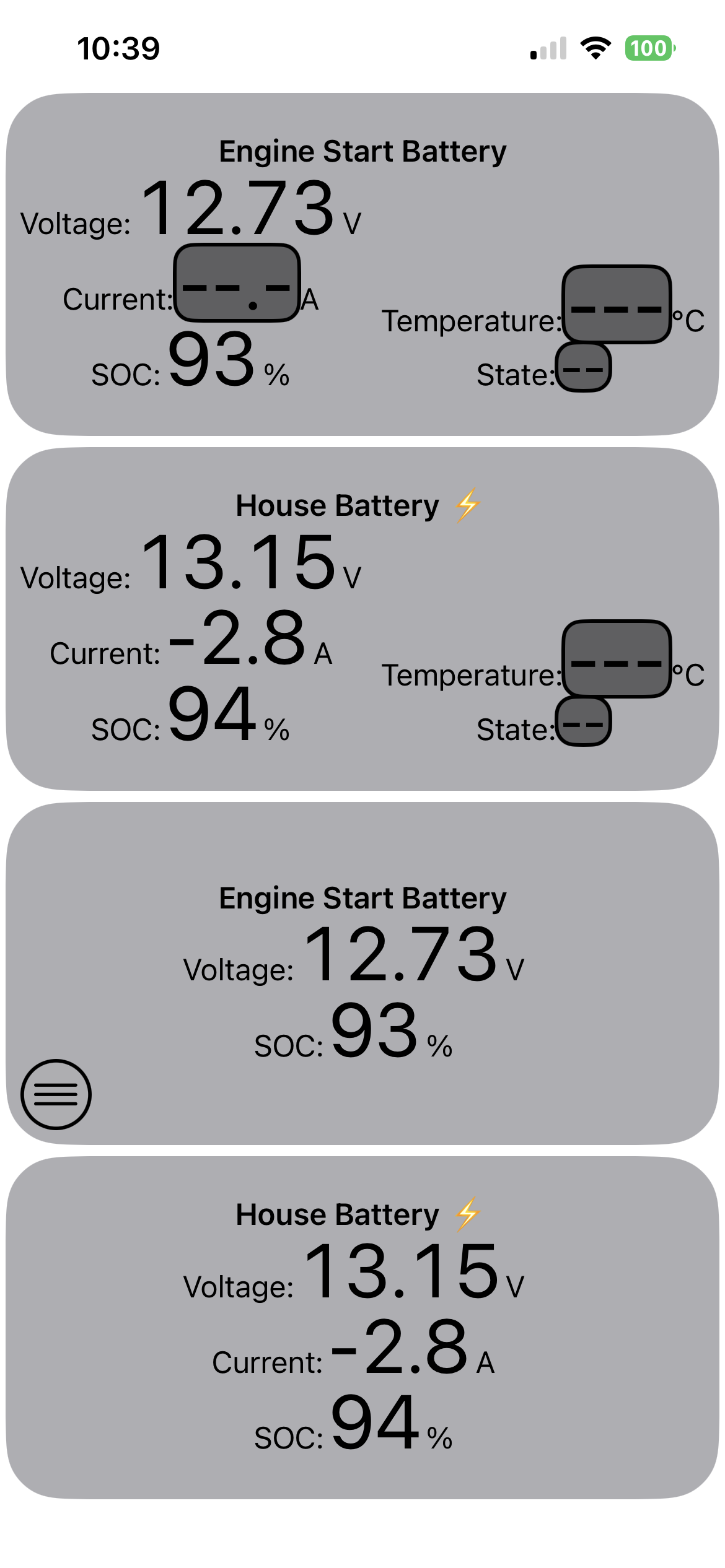
This Page is showing data for two batteries in the top half of the screen and for the same two batteries in the lower half of the screen.
Both views have the same Local name and are monitoring the same batteries. The difference is that the Views in the lower half of the Page have been customised to only show the data that the gauge is actually transmitting. This customisation is managed by a menu assigned to each individual View of a Data Instance.
Battery Instances
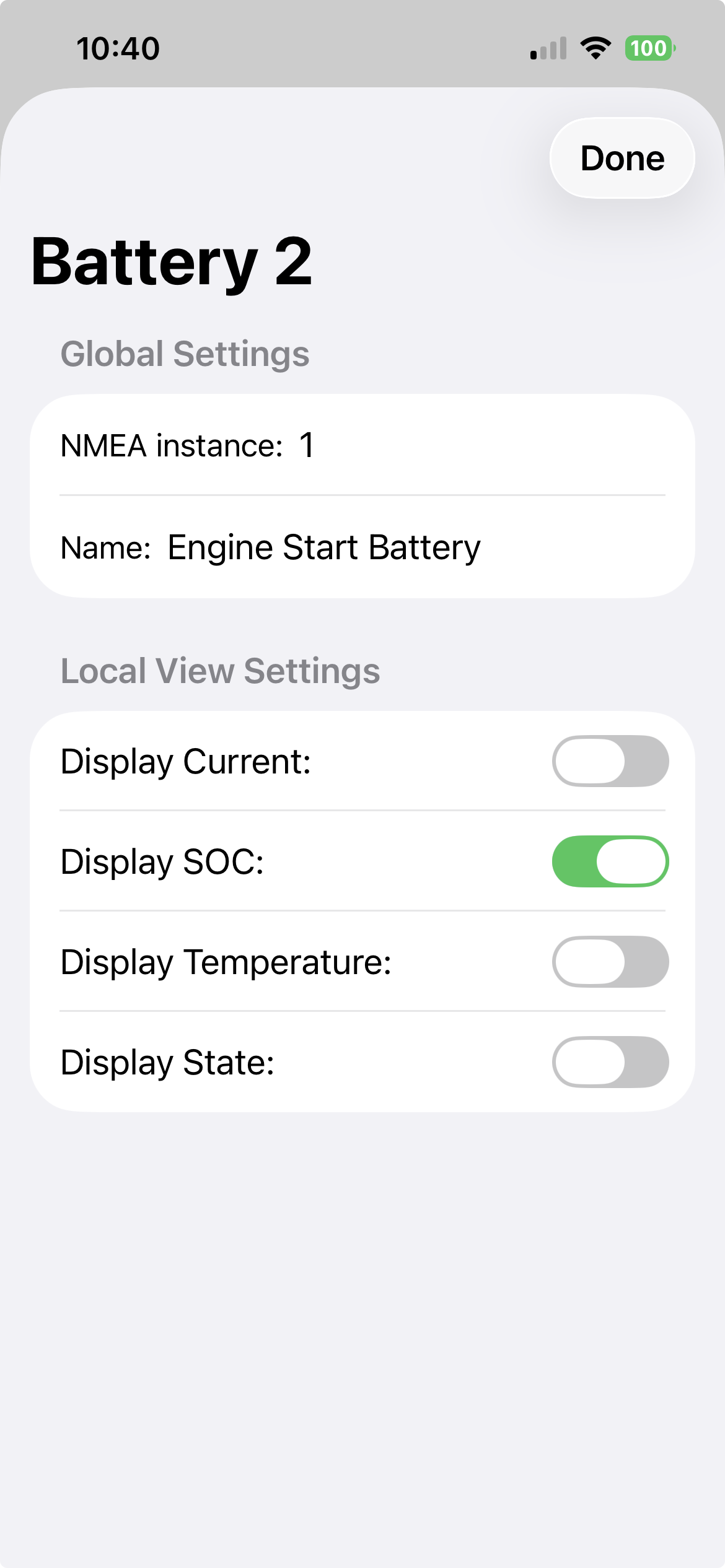
The Data Instance menu for each View is normally hidden but is exposed by a long press (> 1 second) anywhere on the View.
Within the Page showing the Battery Instances the third View from the top has its menu exposed in the bottom left of the View. Tapping this menu causes the Battery Instances menu to be displayed as shown here.
Within this menu we can see:
- The Local Name for this View is "Battery 2" - this name is fixed.
- Globally (I.e. for every version of this View) Battery 2 has been assigned to NMEA Instance 1
- Globally (I.e. for every version of this View) Battery 2 has been assigned the Local name "Engine Start Battery"
- Locally (i.e for only this version of the View) only State of Charge (SOC) is to be displayed
Voltage is always displayed for a battery. This is the only restriction and all other values for a Battery can be displayed or hidden as required.
Data Instance Menu
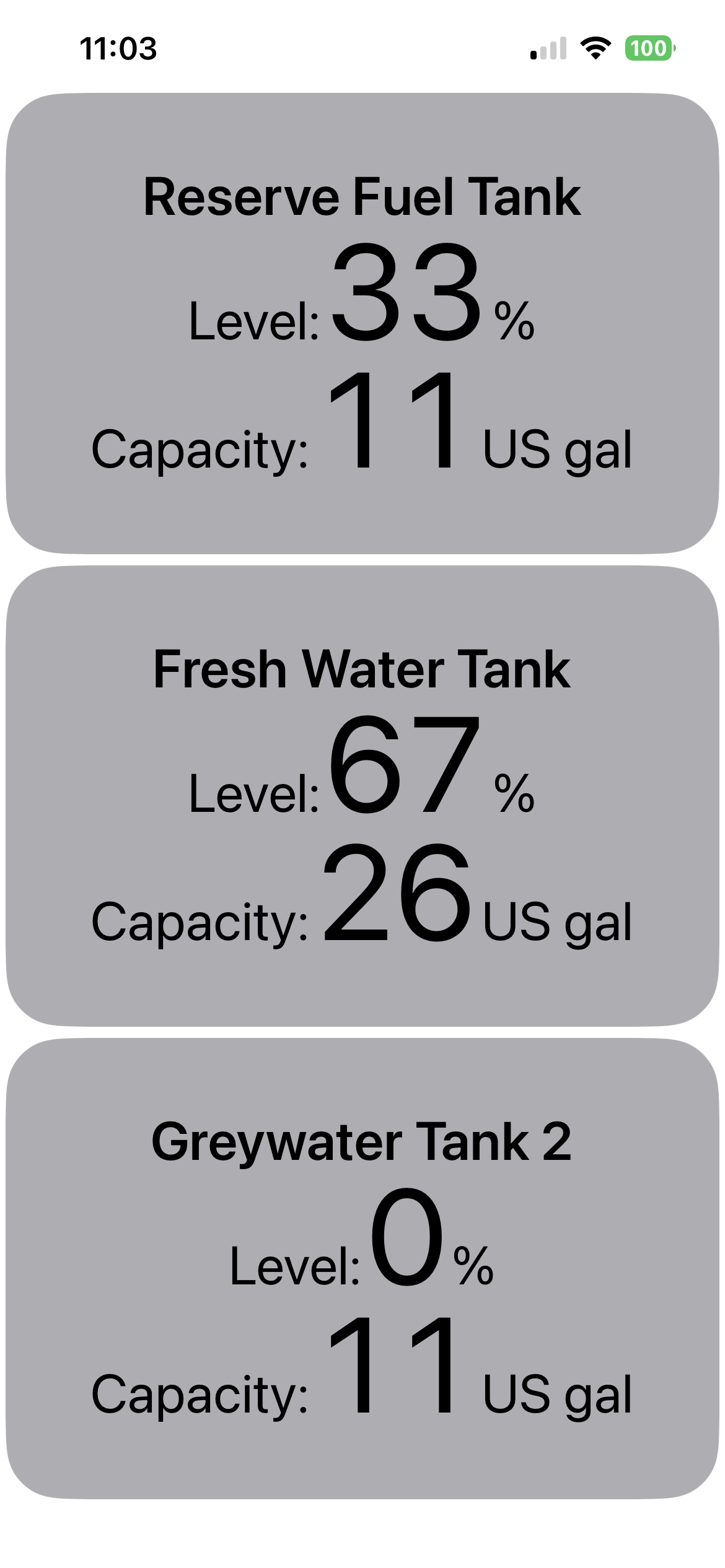
The Page shown here contains three Views that are monitoring Fuel, Water and Grey Water tanks.
A long press on any of these Views will expose its Instance menu which allows the Local Instance to be assigned a Local name and to be assigned to any NMEA Data Instance number.
Normally the only values for a fluid tank are its current level and total capacity and these values are always displayed for a tank instance.
The Local name and assignment to an NMEA Data Instance number may be changed as often as a user requires. The assigned values will be persisted between app launches and will only be reset to default values if navCenter is deleted from your device.
The default values for a Local instance are:
- The Local name matches the Instance name. i.e. Fuel Tank 1 will have the Local name "Fuel Tank 1"
- The Local Instance number will be one greater than the the NMEA Data Instance. I.e. Fuel Tank 1 wiill be assigned to NMEA Data Instance 0.
Tank Instances